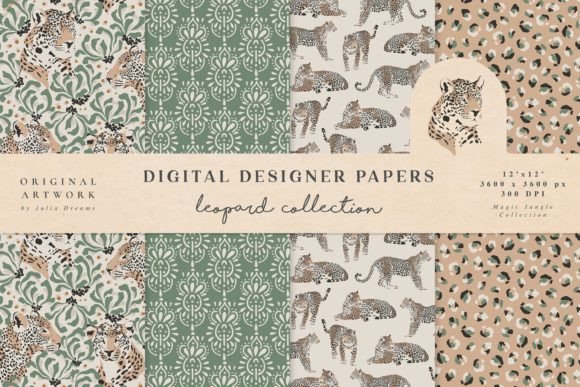
Leopard Seamless Patterns Magic Jungle
Leopard Seamless Patterns Magic Jungle is a curated digital asset collection designed for creators who need high-fidelity, versatile, and production-ready design elements—without the time sink of building from scratch. It’s not just another pattern pack; it’s a workflow accelerator. Whether you’re finalizing a wedding invitation suite, designing a limited-edition product label, or refreshing your brand’s social media templates, this set delivers consistent visual texture with zero technical friction.
What You Actually Get—and Why Format Variety Matters
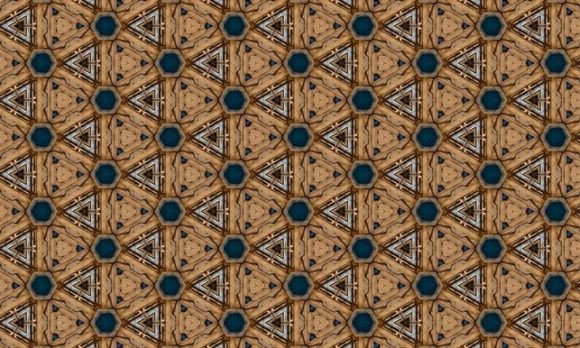
The Leopard Seamless Patterns Magic Jungle includes four hand-painted digital papers, each crafted to tile flawlessly across any surface. What sets this collection apart isn’t just aesthetics—it’s intentional format coverage: raster files (.jpg and .png) at 12 × 12 inches and 300 dpi for print-ready output, plus vector versions (.ai and .eps) for infinite scalability in logos, signage, or packaging mockups.
This dual-format approach bridges common workflow gaps. For example, a freelance graphic designer might drop the .png into a Canva template for quick client proofing, then switch to the .ai file when preparing final press-ready files for a boutique stationery printer. A small business owner launching a new line of leopard-print fabric wraps can use the vector version to scale cleanly across large-format rolls, while the JPEG works perfectly for Instagram product previews and Etsy listing thumbnails.
Fitting Into Real Creative Workflows
Leopard Seamless Patterns Magic Jungle integrates most smoothly when treated as a modular component—not a standalone solution. Think of it like a reliable font family or a trusted color palette: it supports decisions rather than dictating them.
- Before a project: Use the patterns during mood board assembly or brand audit phases. Their organic, hand-painted quality helps ground abstract concepts—like “luxury with edge” or “wild yet refined”—in tangible visual language before committing to full mockups.
- During execution: Drop them into layered PSDs or Figma frames as base textures behind typography or illustrations. Because they’re seamless, they adapt instantly to changing dimensions—no manual tiling or alignment needed when resizing banners, planner covers, or email headers.
- After launch: Reuse assets across touchpoints without visual fatigue. That same pattern used on a wedding invitation can reappear subtly in thank-you card liners, digital RSVP backgrounds, or even custom sticker sheets—all maintaining cohesion without repetition feeling forced.
Compatibility Beyond Software
Technical compatibility is only half the story. The real utility emerges in how these patterns interact with people, platforms, and processes.
For educators creating printable classroom resources, the 300dpi JPEGs print crisply on standard office printers—no need for specialized RIP software or prepress knowledge. Bloggers embedding patterns into Notion or WordPress themes benefit from the transparent PNGs, which layer cleanly over light or dark backgrounds. And because all files are delivered as individual assets (not locked ZIPs or proprietary formats), they slot directly into cloud-based asset libraries—Google Drive, Dropbox, or Adobe Creative Cloud Libraries—making version control and team access predictable.
Importantly, the hand-painted origin means these aren’t sterile algorithmic repeats. Subtle variations in stroke weight, ink bleed, and pigment density add tactile authenticity. That nuance reads as “designed,” not “generated”—a distinction clients and audiences notice, even if unconsciously.
Practical Implementation Tips for Consistent Results
Getting consistent, professional outcomes starts with preparation—not just application.
- Name and organize files systematically. Rename each file to reflect both pattern number and format—for example, LeopardMagicJungle_02_AI.ai. This avoids confusion when toggling between raster and vector mid-project.
- Test scaling early. Open the .eps or .ai file in Illustrator and enlarge it to 200% or 300%. Confirm no pixelation or anchor point distortion occurs—especially important for large-format applications like wall decals or fabric printing.
- Check color mode alignment. While the JPEGs are RGB (ideal for web), verify your print vendor’s preferred CMYK profile before sending final files. Most design apps let you convert non-destructively—but doing it once, up front, prevents last-minute shifts in warmth or contrast.
- Use transparency intentionally. The PNGs include alpha channels. When layering over photos or gradients, experiment with blend modes (Multiply, Overlay) in Photoshop or Figma to deepen texture without obscuring underlying content.
Long-Term Usability and Quality Control
A good pattern collection should age well—and Leopard Seamless Patterns Magic Jungle does. The hand-painted aesthetic avoids trends tied to specific UI eras or filter fads. It holds up equally well in minimalist branding systems and maximalist editorial layouts because its strength lies in texture, not ornamentation.
Quality control begins with source integrity: each pattern was tested across multiple tile sizes (6×6, 9×9, 12×12 inches) and rendering engines (Chrome, Safari, Adobe Acrobat, Affinity Publisher). No visible seams, no ghost lines, no inconsistent spacing. That reliability translates directly into fewer revision rounds and faster client approvals.
For teams or agencies managing multiple brands, storing these assets in a shared, tagged library—with clear usage notes attached—ensures consistency across designers. One person uses Pattern #3 for a logo background; another applies the same asset to packaging foil stamping mockups. The continuity reinforces brand recognition without requiring identical visuals everywhere.
Where Leopard Seamless Patterns Magic Jungle Fits in Your Broader Toolkit
This collection doesn’t replace illustration, typography, or photography—it complements them. It’s the quiet foundation that lets other elements shine. When paired with strong copy, thoughtful layout, and intentional color choices, it adds depth without distraction.
Freelancers report using it to speed up proposal decks: applying a subtle leopard texture to slide backgrounds signals sophistication before the first word is read. Productivity tool builders embed it into printable habit trackers and goal-setting journals—giving functional documents a distinctive, collectible feel. Even educators repurpose the patterns as printable borders for classroom certificates or behavior charts, adding visual reward without overwhelming young learners.
Ultimately, Leopard Seamless Patterns Magic Jungle serves a simple but critical function: it removes one variable from the creative equation. You don’t have to decide *how* to add texture—you already have four proven, production-tested options. That clarity frees mental bandwidth for what matters more: messaging, audience alignment, and meaningful execution.
Final Integration Note
If you’re evaluating whether this fits your current process, ask two questions: First, do you regularly reuse visual motifs across deliverables? Second, do you spend time adjusting or redrawing textures to fit new dimensions or formats? If either answer is yes, Leopard Seamless Patterns Magic Jungle isn’t an extra purchase—it’s a time-saved, error-reduced, quality-locked step in your existing workflow. It doesn’t change how you work. It makes how you already work more sustainable, scalable, and consistently polished.