Happy Graduation Seamless Patterns
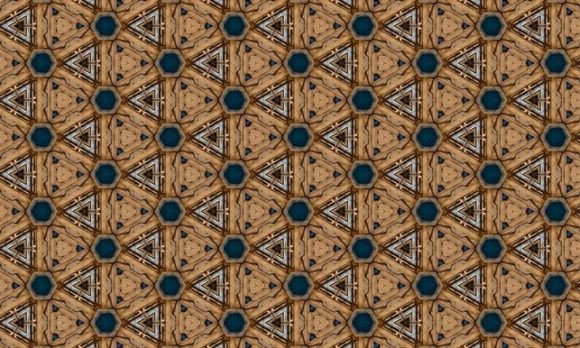
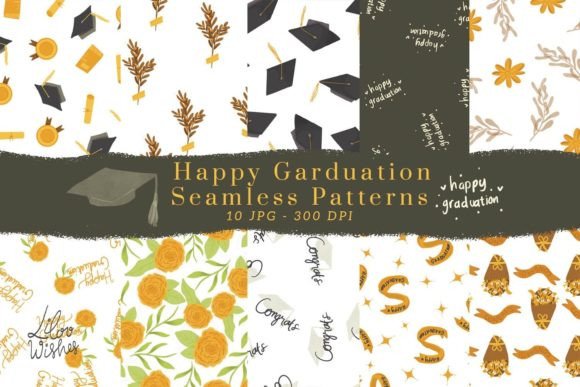
Graduation season brings a surge of creative demand—whether you're designing invitations for a niece’s college commencement, producing branded swag for a school district’s senior recognition event, or building digital assets for an education-focused blog or small business. Happy Graduation Seamless Patterns meets that demand with precision: ten high-resolution, ready-to-use JPG files designed to integrate smoothly into real-world creative workflows. These aren’t generic clipart or low-res downloads—they’re 10 × 10 inch patterns (3000 × 3000 px, 300 DPI), each built to tile infinitely without visible seams, in full color and print-ready format.
Where These Patterns Fit in Your Creative Process
Seamless patterns rarely exist in isolation. They’re part of a chain: from concept → layout → production → delivery. Happy Graduation Seamless Patterns enters most naturally at the *layout and asset assembly* stage—but its value extends earlier and later in the workflow. Before design begins, having these patterns on hand reduces research time and eliminates the need to commission custom illustrations or wrestle with vector tiling. During execution, they function as reliable, consistent background layers—no re-scaling, no distortion, no licensing ambiguity. After finalization, they travel cleanly into print-ready PDFs, social media banners, or fabric mockups without conversion loss.
This isn’t about decoration alone. It’s about reducing friction in repeatable tasks—like producing 50 personalized graduation cards for a PTA fundraiser or building a cohesive suite of digital announcements for a homeschool co-op. When consistency matters and time is finite, seamless patterns act as force multipliers.
Practical Use Cases Across Real Projects
These ten patterns support diverse applications—not just because they’re versatile, but because they’re engineered for compatibility across physical and digital outputs:
- Scrapbooking & Paper Goods: Print directly onto cardstock or photo paper for custom borders, page backgrounds, or layered elements. Their 300 DPI resolution ensures crisp detail even when trimmed or embossed.
- Party Decor & Wrapping: Scale to fit banner dimensions in design software, then output to a wide-format printer—or tile manually across multiple sheets for DIY backdrops. The seamless nature means no awkward gaps between panels.
- Fabric & Wall Art: Import into textile design tools (e.g., Adobe Illustrator’s Pattern Maker or Affinity Designer) to preview repeats on mockups. For wall decals or framed prints, use one pattern as a full-bleed background—no cropping or alignment needed.
- Digital Backgrounds & Social Media: Drop into Canva, Photoshop, or Figma as base layers for Instagram story templates, Zoom virtual backgrounds, or email newsletter headers. Their square aspect ratio simplifies resizing across platforms.
- Branded Stationery: Combine with your organization’s logo and typography in InDesign. Use one pattern as a subtle watermark behind text or as a header/footer band—consistent tone without visual competition.
Integration With Tools You Already Use
You don’t need new software to benefit from Happy Graduation Seamless Patterns. They work natively with industry-standard tools—and even consumer-grade apps:
- In Adobe Photoshop, open any JPG, then use Edit > Define Pattern to add it to your swatch library for instant application via Paint Bucket or Layer Styles.
- In Canva, upload all ten files to your brand kit. Apply them as background images, then use the “Tile” setting in the position menu to enable seamless repetition across any canvas size.
- In Procreate, import as PNGs (no transparency loss), then use the “Clipping Mask + Fill” method to extend across large canvases for custom greeting card designs.
- For print-on-demand services like Printful or Gelato, upload individual patterns as full-bleed backgrounds for mugs, notebooks, or tote bags—no extra tiling setup required.
No plugin, no subscription, no learning curve. Just drag, drop, and scale.
Preparation and Quality Control
Because these are JPGs—not vectors or PSDs—their usability hinges on preparation. Here’s what to do before launching into production:
- Verify color mode: All files are RGB, optimized for screen and standard CMYK print workflows. If you’re sending to a commercial printer requiring specific ICC profiles, soft-proof first using your printer’s supplied profile.
- Test tile behavior: Open one file in Photoshop or GIMP, then use Filter > Other > Offset (with Wrap Around enabled) to check for edge artifacts. These patterns have been pre-tested, but monitor for shifts if applying heavy filters or adjustments.
- Organize for speed: Rename files descriptively (e.g., grad-cap-gold-seamless.jpg, diploma-cream-seamless.jpg) and store them in a dedicated “Patterns/Graduation” folder synced across devices. Avoid burying them in generic “Downloads” directories.
- Proof physical output: Print a single 8.5 × 11 inch test sheet on your target paper stock. Compare screen and print color—especially golds, deep blues, and creams—since monitor calibration varies. Adjust brightness/contrast selectively if needed, but avoid altering saturation globally.
Efficiency and Long-Term Usability
Each of the ten patterns offers distinct visual weight and rhythm—some feature bold icon repeats (caps, diplomas, mortarboards), others lean into subtle textures (chalkboard grain, parchment weave, confetti scatter). That variety isn’t decorative—it’s functional. It lets you match pattern energy to audience and context: energetic for youth-oriented events, refined for alumni associations, minimalist for academic institutions.
Because they’re delivered as individual JPGs—not a single ZIP with nested folders—you retain full control over versioning and reuse. No need to extract or decompress every time. And since they’re not tied to a subscription or cloud service, they remain accessible years later, even if software updates change native pattern-handling behavior.
Think of them less as “graphics” and more as reusable components—like standardized fonts or approved color palettes. Once integrated into your asset library, they reduce decision fatigue during tight deadlines and maintain visual continuity across projects year after year.
Workflow Example: From Concept to Delivery in Under Two Hours
A small business owner needs 30 custom graduation thank-you cards for clients’ graduating children. Here’s how Happy Graduation Seamless Patterns streamlines it:
- Phase 1 (15 min): Select three complementary patterns—one for the card front (bold cap repeat), one for the inside border (subtle laurel motif), one for the envelope liner (confetti scatter). Pre-size all to match card dimensions in Photoshop.
- Phase 2 (40 min): Import into Canva. Use the patterns as layered backgrounds behind client names and handwritten-style messages. Apply consistent typography and spacing rules already documented in their brand guide.
- Phase 3 (25 min): Export as print-ready PDF/X-4, confirm bleed settings, and upload to local print shop. Simultaneously, resize one pattern for a matching Instagram post announcing the service.
Total creative time: under two hours. Zero custom illustration. No licensing negotiations. No pixelated scaling. Just focused execution.
Final Consideration: Matching Intent With Output
These patterns succeed not because they’re “cute” or “festive,” but because they’re built for fidelity and flexibility. They assume you’ll be making decisions—about color harmony, scale, contrast, and context—and give you room to make them well. Whether you’re a freelance designer balancing five client deadlines, a teacher preparing classroom celebrations, or a marketer launching a seasonal campaign, Happy Graduation Seamless Patterns removes one variable so you can focus on what matters: clarity, connection, and timely delivery.
Keep them organized. Test early. Reuse intentionally. And let the seamless repetition do the quiet work—so your message stays front and center.