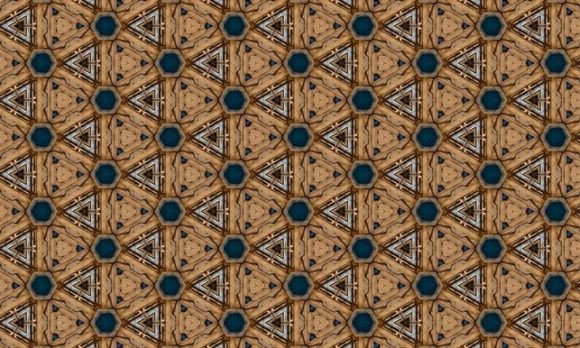
Affinity Seamless Bitmap Cool Patterns
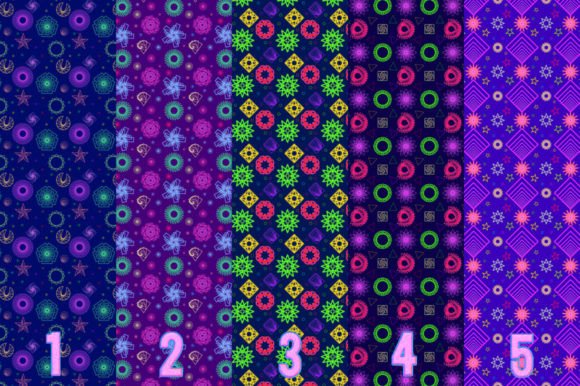
Seamless bitmap patterns in Affinity Designer and Affinity Photo aren’t just background fillers—they’re versatile, scalable creative assets that retain crisp detail at any size. Affinity Seamless Bitmap Cool Patterns gives you five thoughtfully crafted, high-resolution bitmap textures designed from the ground up for seamless tiling. Each one works instantly: import once, apply with the Fill Tool, and scale across banners, packaging mockups, web layouts, or print projects—without pixelation, distortion, or visible seams.
Why These Bitmaps Stand Out
These aren’t generic stock repeats. Every pattern is built with intentional rhythm, balanced contrast, and subtle variation—so they feel organic, not mechanical. They’re optimized for real-world use: no awkward edges, no forced symmetry, no over-processed noise. And because each is delivered in four formats—PNG, JPG, EXR, and HDR—you’re covered whether you’re designing a social media graphic (PNG), prepping for CMYK print (JPG), compositing with lighting control (EXR), or matching real-world illumination (HDR).
All files are captured or rendered at a minimum of 300 DPI, ensuring fidelity across both screen and physical output. You’ll receive one clean ZIP containing 20 total files—5 patterns × 4 formats—ready to drop into your workflow without renaming, converting, or troubleshooting.
How to Use Them in Affinity (It Really Is That Simple)
You don’t need scripting or plugins. Just open your document, select the Fill Tool (shortcut: F), then choose Type → Bitmap from the context toolbar at the top. A file browser opens—select any of your downloaded PNGs, JPGs, EXRs, or HDRs. Affinity automatically detects and tiles the image as a seamless pattern.
No manual offsetting. No layer blending gymnastics. No guesswork. The software reads the edge alignment baked into each file and handles repetition intelligently—even when you stretch, rotate, or mask the fill. Resize your shape to cover a full-page poster or zoom in to inspect texture detail at 400%: quality stays consistent.
Creative Uses Across Real Projects
For designers: Use the granular “Ashen Weave” pattern as a tactile overlay on product mockups—soft enough to enhance but subtle enough not to compete with branding. Try “Deep Ember” as a dynamic background for presentation slides where warmth and depth reinforce messaging about innovation or craftsmanship.
For marketers and small business owners: Apply “Frosted Grid” to email headers or landing page sections to add visual interest without slowing load times (thanks to optimized PNGs). Its light, airy structure supports readability while conveying modern minimalism—ideal for wellness, education, or tech-adjacent services.
For educators and creators: Import “Charcoal Grain” into lesson templates or workshop handouts. Its neutral tone adds texture without visual clutter, helping students focus on content—not background noise. Pair it with bold typography for accessible contrast, or soften it with a low-opacity layer for gentle emphasis.
For publishers and bloggers: Use “Mineral Vein” as a repeating border element around featured quotes or pull-outs. Its irregular, natural flow breaks up rigid layouts and reinforces themes of authenticity and grounded storytelling.
Adapting for Different Platforms & Audiences
What works on Instagram doesn’t always translate to a printed brochure—and that’s where format flexibility matters. For digital-only work, stick with PNGs: transparent backgrounds, fast loading, wide compatibility. For professional print jobs where color accuracy is non-negotiable, use the included JPGs—they’re pre-converted to CMYK-friendly sRGB and sized for bleed-safe scaling.
Need photorealistic lighting integration? The EXR files preserve high dynamic range data, letting you match ambient light in 3D composites or layered photo edits. HDR versions go further—use them when aligning textures with environment maps in Affinity Photo’s advanced tone-mapping workflows.
And because all patterns are resolution-independent in their tiling behavior, you can repurpose one asset across multiple outputs: same “Ashen Weave” file used for a Shopify banner (2000×600 px), a business card (3.5×2 in), and a trade show backdrop (120×80 in)—all without re-exporting or resampling.
Maintaining Clarity and Consistency
Seamless doesn’t mean invisible. To keep your designs intentional and audience-friendly, consider these practical checks before finalizing:
- Test at actual size: Zoom out to 25% view to spot unintended repetition or rhythm fatigue—especially in large-format applications.
- Layer smartly: Apply patterns as fills (not rasterized layers) so they remain editable and responsive to future layout changes.
- Pair with restraint: One strong bitmap pattern per composition usually carries more weight than stacking several. Let it anchor—not overwhelm.
- Check contrast ratios: If placing text over a pattern, verify legibility using Affinity’s built-in contrast checker or external tools like WebAIM.
Ideas to Spark Your Next Workflow
Try these quick, actionable experiments—no extra plugins or downloads needed:
- Create a custom swatch library: Drag each bitmap fill into Affinity’s Swatches panel. Name them by mood (“Calm,” “Urgent,” “Earthy”) rather than just file names—so you build intuitive, project-aligned choices over time.
- Combine with vector shapes: Draw a circle, apply “Mineral Vein,” then use Layer > Rasterize to clip it into a badge or icon. Repeat across a set for cohesive branding.
- Use as non-destructive overlays: Place a pattern fill on a new layer above your design, set blend mode to Multiply or Overlay at 15–30% opacity—adds depth without masking original elements.
- Export for team use: Share your ZIP folder with collaborators, then document which pattern suits which brand guideline (e.g., “Frosted Grid = blog headers only”). Consistency grows from shared context—not just shared files.
Affinity Seamless Bitmap Cool Patterns isn’t about adding decoration—it’s about giving your work texture with purpose. Whether you’re building a client’s identity system, preparing classroom materials, or refining your own portfolio, these bitmaps offer reliable, adaptable substance. They’re built to support your voice—not distract from it.
Start small: pick one pattern, open a blank canvas, and try it as a fill. Notice how it behaves when you resize, rotate, or mask it. Then ask: where does this make my next project feel more intentional? That’s where real creative momentum begins.